Oracle to T-SQL Migration Toolkit: Custom Agents, Parallel Pipelines, and a Rubber Duck
Last week I presented a demo of a project I had been working on, and the reaction from people in the room made me think: maybe this could be useful beyond my own use case. So I decided to open-source it.
The project is Oracle to T-SQL Migration Toolkit, a GitHub Copilot-powered set of custom agents that help you migrate Oracle SQL and PL/SQL code to Microsoft SQL Server T-SQL. It works both in VS Code and in GitHub Copilot CLI, and the CLI experience has a pretty interesting trick up its sleeve that I will get to in a minute.
Where this came from
If you have ever been involved in a database migration from Oracle to SQL Server, you know the pain. It is not just about swapping syntax. Oracle and SQL Server have fundamentally different approaches to things like packages, sequences, session state, empty string semantics, cursor handling, date types, and on and on. Every migration I have seen involves a lot of manual work, a lot of spreadsheets, and a lot of “we will deal with that edge case later” moments that come back to bite you.
I wanted to see how far I could push GitHub Copilot’s agent and instructions system to actually automate this process in a structured, repeatable way. Not just “paste this PL/SQL and ask Copilot to convert it,” but a real pipeline with evaluation, conversion, validation, performance analysis, and even Power BI M-language generation, all coordinated by agents that know what they are doing.
How it works
The toolkit defines six custom agents, each responsible for a specific phase of the migration:
| Agent | What it does |
|---|---|
@oracle-evaluator |
Reads your Oracle SQL, identifies complexity, Oracle-specific features, semantic traps, and gives you a migration readiness assessment |
@oracle-to-tsql |
Does the actual conversion, following all the rules from a shared reference (copilot-instructions.md) |
@tsql-validator |
Validates the converted T-SQL against the original, checking for correctness and completeness |
@performance-analyzer |
Looks at the T-SQL output and suggests indexing strategies, SET options, query rewrites |
@m-language-converter |
Generates Power BI M-language (.pq) files from the T-SQL output |
@migration-orchestrator |
The batch coordinator that runs everything in parallel using sub-agents |
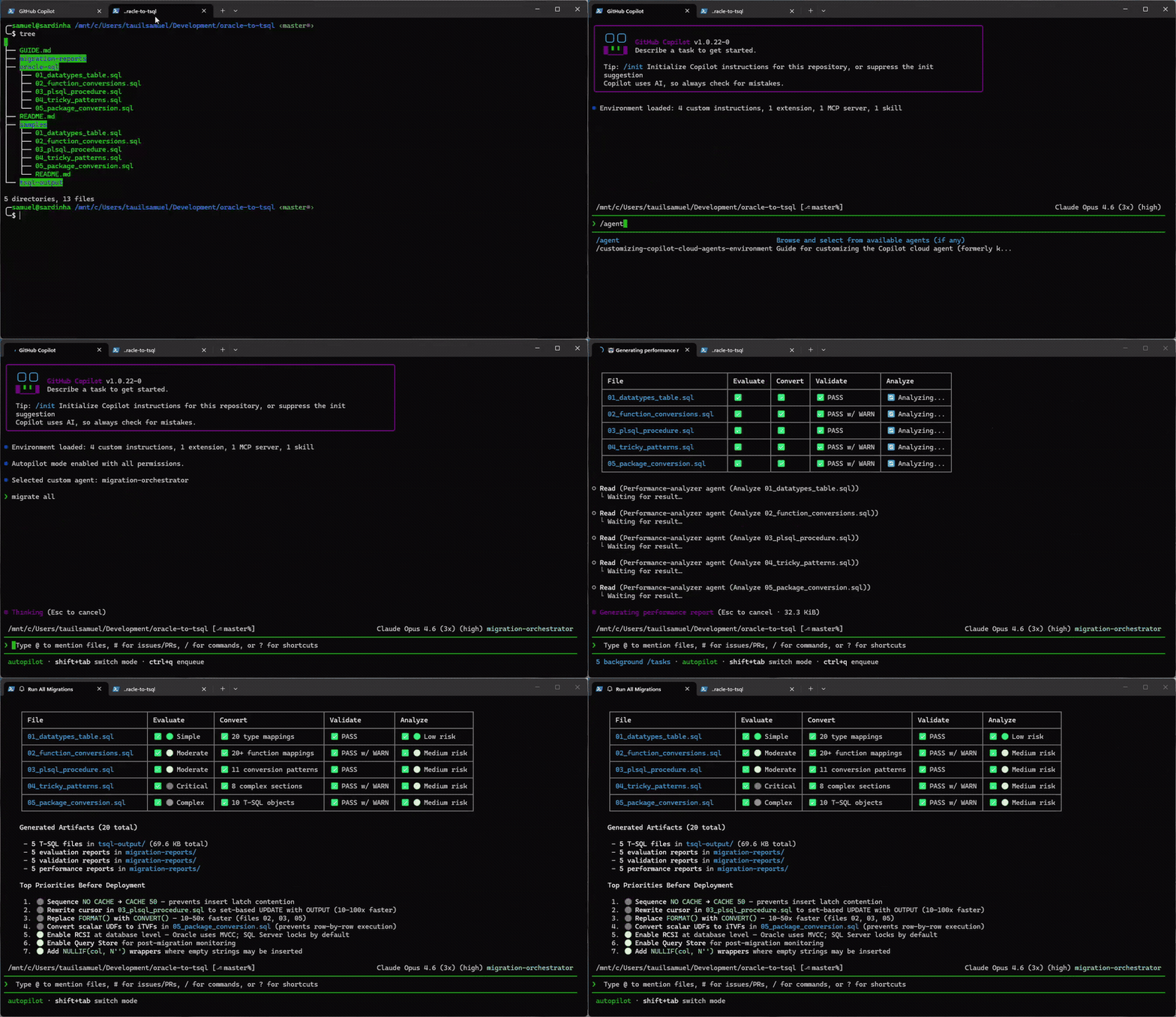
The pipeline is simple: you drop Oracle SQL files into oracle-sql/, and the orchestrator takes it from there. It scans the files, builds a plan, dispatches sub-agents (one per file), and tracks progress through a state machine. Each file goes through evaluate, convert, validate, analyze, and optionally generate M-language.
The whole thing produces structured reports in migration-reports/, converted SQL in tsql-output/, and Power BI queries in pbi-output/.
The reports are actually useful
This is the part that surprised me the most. The migration reports are not just “here is your converted code.” Each report has multiple sections: evaluation findings with severity levels, detailed type mapping tables, semantic difference analysis, validation results, and performance recommendations.
For example, the evaluator catches things like Oracle’s DATE type including a time component (mapping it to T-SQL DATE would silently truncate time, which breaks things downstream), or the fact that Oracle treats empty strings as NULL while SQL Server does not. These are the kinds of issues that cause data integrity problems in production if you miss them, and the agents are specifically instructed to flag them.
The complexity ratings go from simple DDL translations to critical cases like full PL/SQL package conversions with session state, REF CURSORs, and initialization blocks. The sample files in the repo cover this range deliberately, from a straightforward table definition to a complete package spec and body with five public routines, private helpers, and package-level variables.
VS Code vs Copilot CLI
Both work, but they have different strengths. In VS Code, you get the agents through Copilot Chat and you can work file by file, drag things into the chat for context, use inline chat for quick conversions, and compare Oracle source and T-SQL output side by side.
In Copilot CLI, you get the full power of the extension tools. The custom extension (extension.mjs) provides tools like scan_oracle_files, migration_status, generate_batch_plan, claim_work_item, and complete_work_item. These let the orchestrator actually manage a work queue with state tracking, and dispatch sub-agents in parallel, up to five files at a time, each going through the full pipeline independently.
But the real killer feature of the CLI experience is Rubber Duck.
Rubber Duck makes the reports better
Rubber Duck is a feature in GitHub Copilot CLI where a second model from a different AI family reviews the primary agent’s work. When you are using a Claude model as your orchestrator, Rubber Duck brings in GPT-5.4 to critique the output at key checkpoints: after planning, after complex implementations, and after writing tests.
For a migration toolkit, this is gold. The primary agent does the conversion, and then Rubber Duck reviews it from a completely different perspective. Different training data, different biases, different blind spots. It catches things like architectural issues, subtle bugs, and edge cases that the primary model might have been too confident about.
In practice, what this means is that the migration reports generated through Copilot CLI tend to be more thorough and more nuanced than those generated in VS Code. The Rubber Duck critique adds a layer of validation that is especially valuable for the critical-complexity files, the ones with CONNECT BY hierarchical queries, BULK COLLECT operations, or full package conversions with session state management.
You can try it yourself: run /experimental in Copilot CLI to enable Rubber Duck, pick a Claude model, and let the orchestrator process your Oracle files. The difference in report quality is noticeable.
Running it yourself
Getting started is straightforward:
git clone https://github.com/samueltauil/oracle-to-tsql.git
cd oracle-to-tsql
Drop your Oracle SQL files into oracle-sql/ (or copy the included samples):
cp samples/*.sql oracle-sql/
Then select the migration-orchestrator agent (in VS Code, pick it from the agent list in Copilot Chat; in Copilot CLI, select it from the available agents) and ask it to run the full pipeline:
migrate all
Check progress with:
status
Results show up in tsql-output/, pbi-output/, and migration-reports/. The repo includes five sample files that go from simple to critical complexity, so you can see the full range of what the toolkit handles before pointing it at your own codebase.
What is actually in the repo
There is no application code in the traditional sense. The toolkit is entirely built on GitHub Copilot’s customization features:
- copilot-instructions.md: A comprehensive Oracle-to-T-SQL conversion reference that all agents share
- Path-specific instructions: Context files that tell Copilot what each directory contains and what standards to follow
- Agent definitions: Six
.mdfiles that define each agent’s role, tools, and behavior - Custom extension: A
.mjsfile that provides discovery, status tracking, batch planning, and state management tools
The idea is that you clone the repo, open it in VS Code or Copilot CLI, and the agents just work. No dependencies to install, no build steps, no configuration files to set up. It is just Copilot customization files and your Oracle SQL.
Why I open-sourced it
After the demo last week, a few people asked me about using the agents for their own migrations. That was the signal. Database migrations from Oracle to SQL Server happen all the time, and the amount of manual effort involved is significant. If a set of well-designed Copilot agents can take a chunk of that work off your plate, and produce structured, reviewable reports in the process, that seems worth sharing.
The repo is public: github.com/samueltauil/oracle-to-tsql
If you have Oracle SQL that needs to move to SQL Server, give it a try. And if you find patterns that the agents do not handle well, open an issue or contribute. The conversion reference and agent definitions are all just Markdown files, so extending them is as simple as editing text.