Customer Demo: Agentic Workflow Reviewing Next.js Bundle Budgets and Updating PRs
Recently, I sat down with a customer who had a problem I hear all the time. Their Next.js app had been growing for about a year, and nobody was really watching the bundle size. Every few sprints someone would notice the page felt slow on a phone, run a profile, find a 200 kB dependency that snuck in through a transitive import, and the team would spend a Friday ripping it back out. The fix was easy. The detection was the part that was broken.
So I asked them the question I always start with for this kind of thing: can you put an agent in CI without turning the pipeline into a black box? They were skeptical, which is fair. Most of the agent demos floating around right now want to take over your pipeline, run with whatever permissions they can grab, and write commits you have to review after the fact. That is not what I wanted to show them.
My answer is yes, as long as deterministic CI stays the source of truth and the agent only adds a layer of judgment on top. The build still has to build. The tests still have to pass. The agent does not get to lie about any of that. What it does get to do is read the artifacts the build produces and tell you something useful in plain language, in the place where the team is already looking.
I built a small demo for it: samueltauil/agentic-log-analyzer. It runs a normal Next.js build, generates a bundle analyzer report, checks the numbers against budgets and thresholds I set ahead of time, and posts what it found back to GitHub as a PR comment and a check run. Nothing fancy. The whole point is that the moving parts are boring and visible.
The agent side of it is built on GitHub Agentic Workflows (gh-aw), a project from GitHub Next and Microsoft Research that lets you write the workflow in plain markdown and compile it into a regular .lock.yml GitHub Actions file. That choice was important for the demo. It meant I could hand the customer a markdown file and a budget JSON file and say “this is the whole thing”, without waving at a hosted service or a SaaS dashboard they would later have to procure.
What I Showed in the Demo
The loop is short, which is half the reason it works:
- CI builds the Next.js app and produces the bundle analyzer artifacts.
- The agentic workflow reads those artifacts and
bundle-budget.json. - It compares route and bundle sizes against the warn and fail thresholds.
- It cross-checks the dependency list for known size offenders.
- It posts findings on the PR and updates the check status.
- For pushes to
main, it opens or updates a tracking issue instead of commenting.
That division of labor is what got the customer nodding. The build still passes or fails on its own terms, and the agent reads the result and explains it. If the agent crashes tomorrow, CI keeps shipping. The blast radius is intentionally small.
I also showed them the prompt. People always want to see the prompt. It is short, it tells the model what file shapes to expect, and it tells it what it is allowed to write back. That last part matters more than the model choice. If the agent only has permission to leave a comment, update a check, and open one labeled issue, you can reason about the worst case in about thirty seconds.
The Workflow Is Also Just a Markdown File
The agent itself lives in .github/workflows/bundle-analyzer-agent.md. That is the whole thing. YAML frontmatter at the top tells gh-aw what trigger to wire up, what permissions the run gets, which tools the agent can call, and which safe-outputs it is allowed to emit. Everything below the frontmatter is a numbered list of steps in plain English, the same instructions I would give a junior engineer doing this review by hand.
The relevant pieces of the frontmatter look like this:
on:
  workflow_run:
    workflows: ["Build and Analyze"]
    types: [completed]

permissions:
  contents: read
  actions: read
  pull-requests: read
  issues: read

tools:
  bash: [":*"]
  github:
    toolsets: [default, actions]
  agentic-workflows:
    web-fetch:

safe-outputs:
  add-comment:
    target: "*"
    max: 1
  create-issue:
    title-prefix: "[bundle-analyzer] "
    labels: [performance, bundle-size, automated]
    max: 1
    deduplicate-by-title: 1
    close-older-issues: true
  create-check-run:
    name: "Bundle Analyzer"
    max: 1
A few things to call out, because they are the answer to most of the security questions I get:
- The
permissionsblock is read-only. The agent’sGITHUB_TOKENliterally cannot write to the repo. The only way anything gets posted back is through thesafe-outputsgate, and that gate has a fixed shape: one comment, one issue (with a title prefix and labels), one check run. Nothing else. - Bash is wide open inside the sandbox (
bash: [":*"]), and that is on purpose. The security boundary is not “did I allowlistmkdir”. It is the layered model gh-aw enforces around the run: a read-only token, no repo secrets in the agent process, an ephemeral container, and an outbound network firewall (the Agent Workflow Firewall) that only allows traffic to a small set of pre-approved domains. If the model decides to be creative andcurlsomething weird, the firewall drops it. - The actual run is generated by
gh awat compile time. It takes the markdown, validates the schema, pins the actions to SHAs, and emits a normal.lock.ymlActions workflow. That file gets committed to the repo too, so the diff is reviewable like any other Actions change. There is no “trust me” step.
The body of the markdown file is the prompt. It tells the agent which files to read out of the artifact (context.json, bundle-budget.json, build.log, the client-stats.json and client-modules.json from @next/bundle-analyzer), which jq queries to run for the top modules, how to decide between success / neutral / failure, and exactly which safe-output to call in each case. The decision table is in the prompt, not in the model’s head. The model is mostly being asked to read JSON and fill in a markdown template.
This is the part of gh-aw I keep coming back to in customer conversations: the workflow is something you can cat and a security reviewer can sign off on in one sitting. It is not a black box you talk to through an API.
The Budget Gate Is Just a File
The thresholds are not buried in a prompt. They sit in bundle-budget.json, versioned next to the code, which made the governance question easy to answer. The customer’s platform team had been burned before by tools that hid policy inside SaaS dashboards, and they wanted to know who could change a limit and how that change would show up in review. The answer here is simple. You change the file, you open a PR, the diff is right there.
When someone later asks why a PR got flagged, I can point at two things: the budget file in the repo, and the comment plus check the agent left on the PR. There is no hidden state to reverse-engineer, no “ask the bot why” step. The numbers came from the artifact, the rules came from a JSON file, and both of them are in git.
Result 1: Issue Created by the Workflow
When a run on main turns up something worth tracking, the workflow opens an issue for it instead of just dumping a comment into a PR that nobody is going to revisit. Here is the one from the demo, labeled bundle-size, flagging full lodash (67.9 kB) and moment (57.8 kB) sitting in the server bundle. Both are classic offenders, both show up as full imports a lot more often than people realize, and both have lighter replacements that the recommendations section calls out directly.
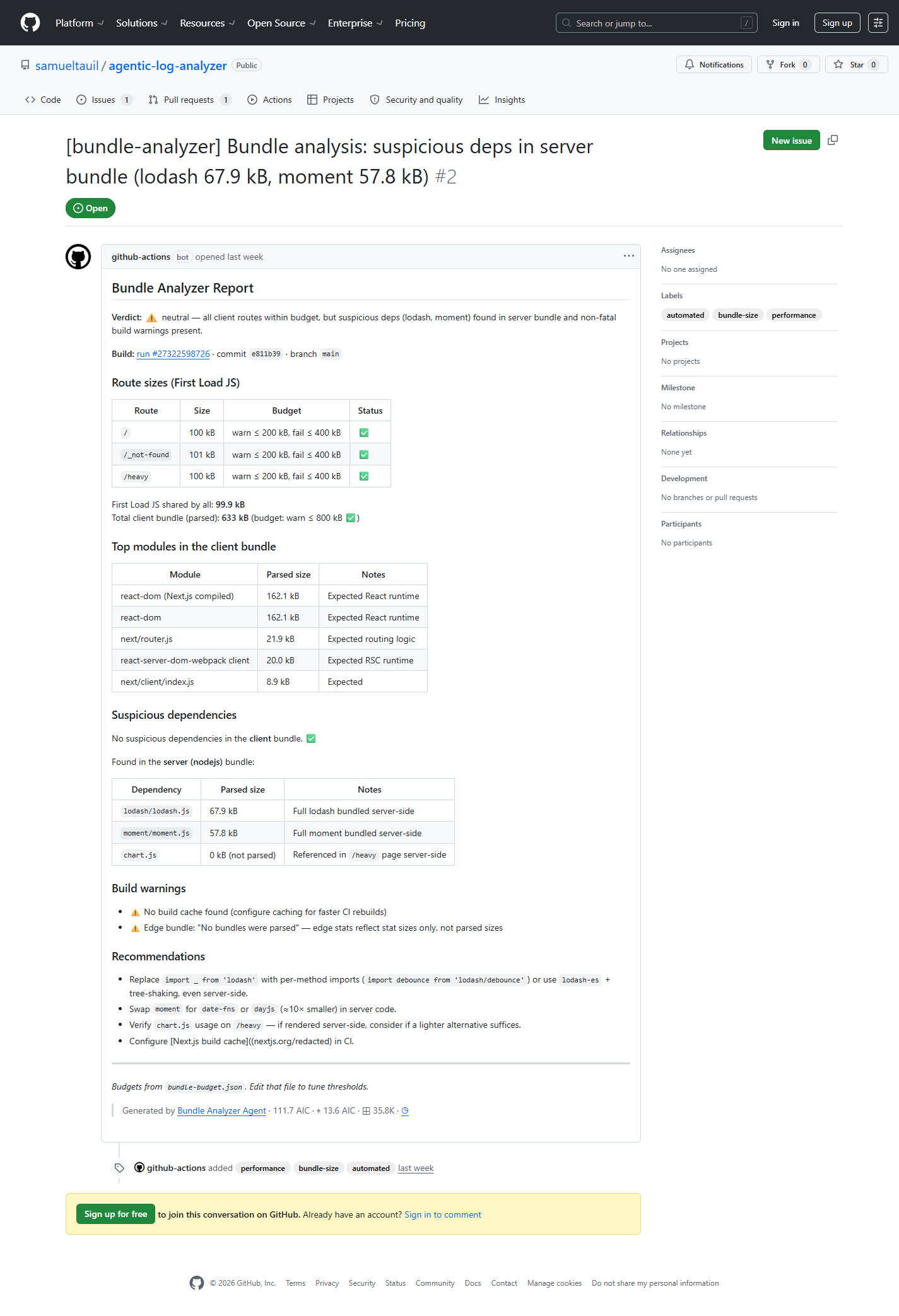
The thing I like about this view is that it is doing the boring work a senior engineer would do during code review, before they get to the actual review. It pulled the route sizes, split client from server, and named the suspect modules before a human ever opened the issue. By the time you look at it, the question has gone from “is there a problem” to “do we want to fix it now or later”, which is a much shorter conversation.
Issue reference: #2
Result 2: PR Updated with Findings
On a pull request, the same workflow comments with the report and adds a Bundle Analyzer check, so the size verdict shows up right next to the rest of the PR checks. This is the demo I usually start with, because it answers the question every reviewer has been quietly asking for years: did this PR make the bundle bigger, and by how much?
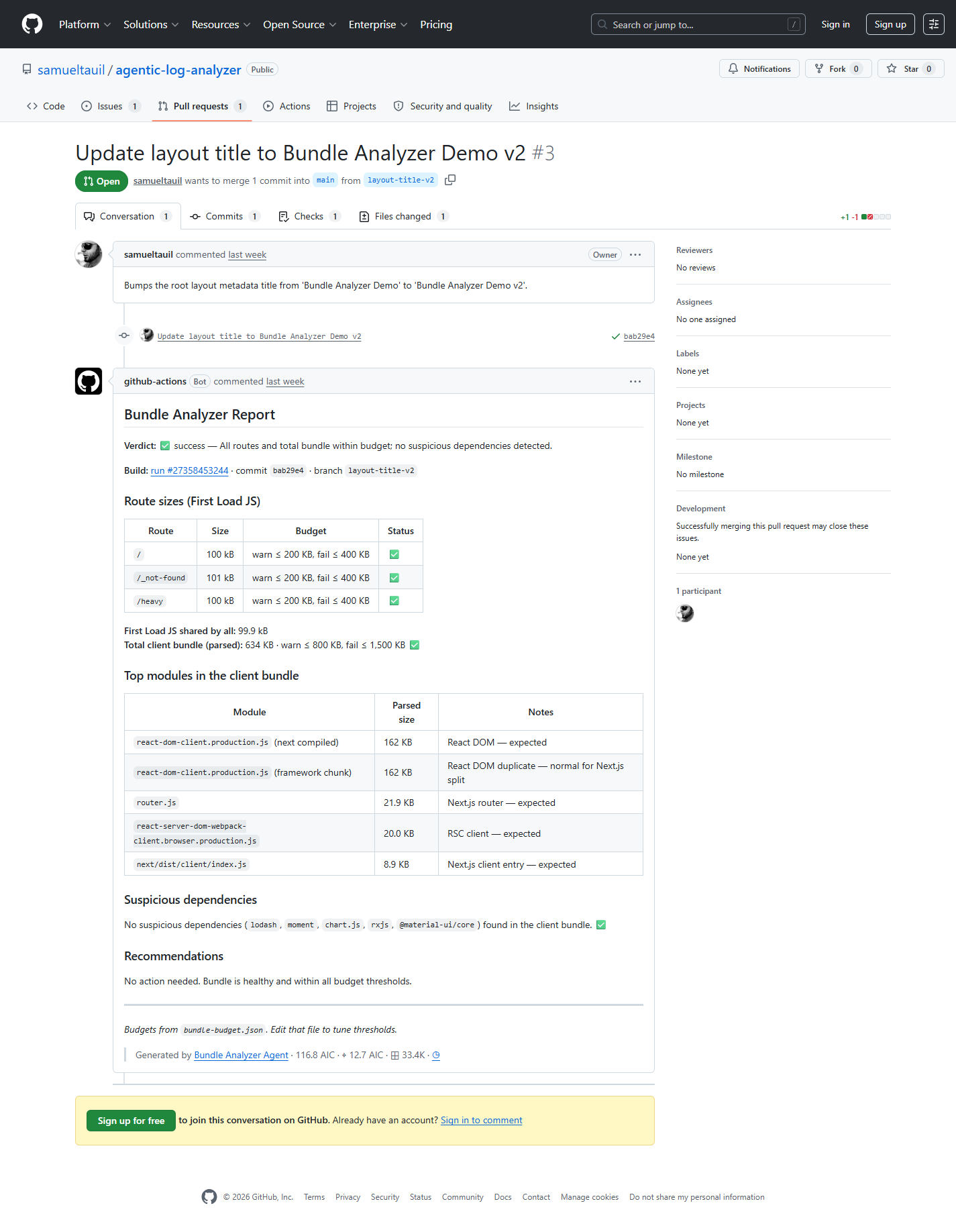
In this run everything is healthy: routes within budget, total client bundle parsed at 634 kB against an 800 kB warn threshold, no suspicious dependencies found. That is the boring case, and the boring case is the point. When the bundle is fine, the comment says so quickly and gets out of the way. When it is not fine, the same template lights up red in the verdict line and the recommendations section fills in. Same shape, different state.
PR reference: #3
What the Customer Reacted To
A few points stuck with them, and they were not the ones I expected going in:
- It reads the actual compiled output, not a guess from the source files. They had been burned by static analysis tools that lied about tree-shaking.
- The budget policy is explicit and lives in version control. No dashboard, no admin console, no surprise.
- The feedback appears where the team already works. Nobody has to learn a new tab.
- The agent can only take a handful of declared actions, which makes it easier to trust in a real pipeline. Their security review was a five-minute conversation instead of a two-week project.
The most interesting reaction came from their team lead, who said something like “this is the first agent demo I have seen that does not feel like it is trying to replace me.” That was the goal. The agent is not the engineer. It is the spreadsheet that the engineer was going to build by hand if nobody else built it first.
Why I Like the Pattern
The agent is not trying to take over CI. It makes the CI you already have say something more useful.
The pipeline answers the yes or no questions: did it build, did the tests pass. The agent answers the one underneath: given the budget I set, is this change still healthy enough to merge? That is a more interesting thing to talk about in review, and it is a question that almost always gets skipped because nobody wants to be the person who blocks a PR over 30 kB.
If you want to try it, clone the demo repo and edit bundle-budget.json until the thresholds match how much bundle growth you are willing to live with. Start loose, watch where the warnings land, tighten from there. The fun part is that once the budget file is in the repo, the conversation about performance stops being abstract. It becomes a diff.